
A weekly creator review: turn audience comments into your next content decision
Review channel context, audience questions, comment themes, and content coverage in ANTRAMIC. Leave with one practical action and the evidence behind it.
A useful weekly review ends with a small, evidence-backed decision. Check data freshness, read recurring audience questions in context, compare them with what you have published, and choose one next action. Revisit the decision after new evidence arrives.
Begin with the channel and the available evidence
A creator dashboard is easier to use when you know what question you brought to it. Before opening the numbers, pick a channel and a period. Are you reviewing a new upload, a series, or the questions that appeared over the last week?
In ANTRAMIC, the home screen brings connected content and audience context together. Check the selected account, the latest sync, and which permissions are available. Missing analytics access or a delayed sync changes what you can reasonably conclude.
The current foundation is creator-authorized YouTube analysis. Instagram and X are limited pilots. The connection status page explains the boundaries.
Read the questions behind the summary
Open audience comments and look for questions you can answer. Read the video title and surrounding context. A short comment can mean something quite different when it is part of a reply thread or refers to a joke in the video.
AI classifications can help you find a starting point. They can also misread sarcasm, slang, or a missing reference. Check the source comments before you treat a summary as an instruction.
For example, several questions about a recipe’s storage may justify a clear answer in the description or a follow-up clip. The useful fact is the recurring question you verified, rather than the AI label by itself. This example illustrates a review decision; it is not a reported customer result.
Compare recurring themes with what you have published
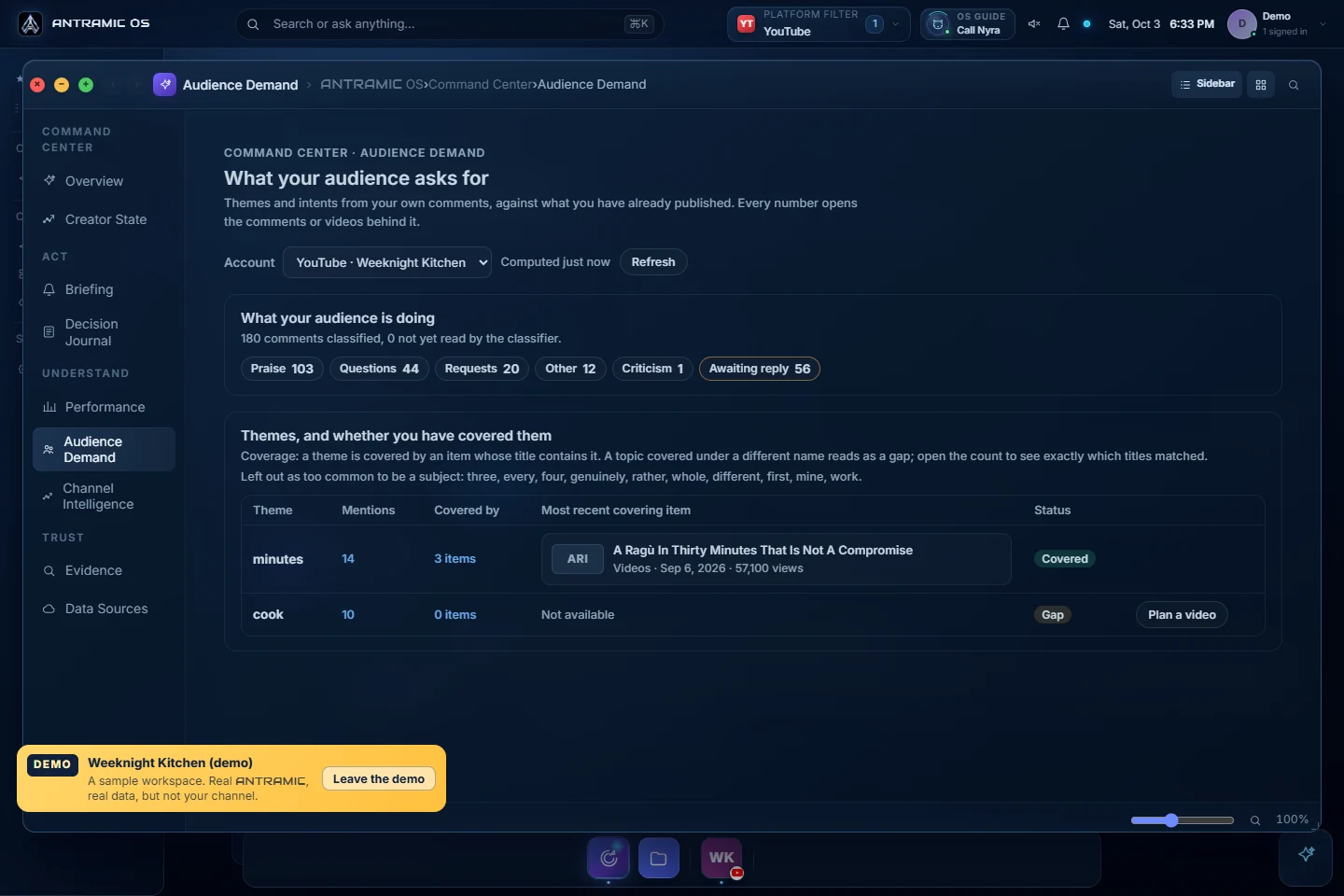
The Audience Demand screen groups comment intents and themes, and links to the evidence behind its counts. It also lets you examine how a theme relates to published content.
Coverage needs interpretation. The current screen checks whether a theme appears in a content title. A video may answer the question under a different title, so a displayed gap deserves a closer look. Open the related content and comments before deciding that the topic is missing.
Comments come from people who chose to write. They are valuable feedback, but they are not a survey of every viewer. Give a repeated request attention without assuming the whole audience agrees.
Choose one action you can explain
Finish the review with a decision small enough to carry out. It might be replying to a question, adding a clarification, investigating a topic, or planning a follow-up video.
- Observation: what did you see in the source comments?
- Interpretation: what do you think people need?
- Action: what will you do next?
- Check: what new evidence would make you reconsider?
Keep observation and interpretation separate. “Four people asked how to store this” is evidence. “Most viewers need a storage guide” is a broader claim that those comments alone cannot support.
Content planning, automatic publishing, and commercial matching remain roadmap areas. You can use the current evidence to inform work you carry out in your existing tools.
Return to the decision next week
Record the evidence and the action in your own working notes or an available OS workflow. Next time, check what changed. Did new comments clarify the need? Did you answer the original question? Was another explanation more useful?
A good review builds continuity without demanding a new strategy every week. The goal is a better next decision, backed by something you can point to.
See the actual OS demo screens, read the comment analysis guide, or use the FAQ to check permissions and availability.